
Top 5 Reasons To Download TranscriptSnagger
Alright, tech enthusiasts, content creators, students, and curious minds, gather 'round! There’s a new player in town, or rather, a game-changing utility that’s currently making waves, and if you're not on board, you’re seriously missing out. In the vast ocean of online content, YouTube stands as an undisputed titan, a seemingly infinite wellspring of information, entertainment, and education. But for all its glory, accessing its content in a truly flexible and powerful way has often felt like an uphill battle. We've all been there – trying to quickly find a specific quote, needing a transcript for a presentation, or wishing we could easily get the captions for a video we're editing. Well, prepare to have your workflow revolutionized, your research accelerated, and your content creation superpowers amplified! We're talking about TranscriptSnagger, a tool that doesn't just promise to make your life easier; it genuinely delivers a suite of features that you'll soon wonder how you ever lived without. And the best part? It's presented here as an unmissable giveaway, a golden ticket to unlocking the true potential of YouTube's textual content. So, without further ado, let's dive into the top five reasons why this isn't just another download, but an essential addition to your digital toolkit.
- Unlock the Textual Goldmine: Effortless Caption & Transcript Downloads
- Global Reach & Linguistic Liberation: Accessing Multilingual Content Made Easy
- Precision Navigation & Research Power: The Revolutionary In-Video Word Search
- Unleash Your Productivity: Repurpose, Learn, and Analyze Like Never Before
- Simplicity Personified: A Seamless User Experience for Everyone
1. Unlock the Textual Goldmine: Effortless Caption & Transcript Downloads
Let's be brutally honest: the internet is brimming with incredible video content, but for far too long, the textual underpinnings of that content have remained frustratingly out of reach. Think about it. You watch an insightful documentary, a gripping interview, or an educational lecture on YouTube. The information is priceless, but capturing it, citing it, or even just reviewing it without having to re-watch the entire video can be a colossal pain. This is where TranscriptSnagger swoops in like a digital superhero, transforming inaccessible spoken words into tangible, usable text files. This isn't just a minor convenience; it's a fundamental shift in how we interact with video content, turning transient audio into a permanent, searchable, and editable asset.
One of TranscriptSnagger's headline features is its ability to effortlessly download SRT caption files. If you're a video editor, a content creator, or anyone involved in making video accessible, you know the value of an SRT file. These files are the backbone of subtitles, allowing you to easily add captions to your own edited versions of videos, ensuring your content reaches a wider audience, including those with hearing impairments or who watch videos in sound-off environments. Imagine the time saved! No more manual transcribing or relying on YouTube's often-flawed auto-generated captions if higher-quality, human-uploaded ones are available. With TranscriptSnagger, you simply paste the URL, choose the language, select SRT, and boom – you have professional-grade captions ready for integration. This functionality alone justifies the download, providing an indispensable tool for enhancing video accessibility and professionalism.
But the textual goldmine doesn't stop there. Beyond SRT files, TranscriptSnagger empowers you to download full text transcripts, offering a level of versatility that truly sets it apart. Whether you need a transcript for academic research, for creating detailed notes from an online course, or for generating written content from a spoken presentation, TranscriptSnagger delivers. What's particularly brilliant is the choice it offers in text transcript formats. You're not just getting a raw dump of text; you can tailor the output to your specific needs. Do you want a clean, flowing paragraph form that's perfect for reading, summarizing, or directly importing into a document? Or do you prefer a line-by-line format, complete with or without timecodes, which is invaluable for precise referencing, syncing with audio, or detailed analysis of speech patterns? This level of control is rarely found in similar tools, turning a simple download into a strategic asset. For students, researchers, journalists, and anyone who needs to dissect spoken content, having a perfectly formatted, accurate transcript at your fingertips is a game-changer. It means you can focus on comprehension and analysis, rather than the tedious and error-prone task of manual transcription. TranscriptSnagger doesn't just give you text; it gives you usable text, perfectly suited for whatever you need to achieve.
2. Global Reach & Linguistic Liberation: Accessing Multilingual Content Made Easy
In today's interconnected world, content transcends borders, and the wealth of knowledge available on YouTube in languages other than your own is truly staggering. However, for many, the language barrier acts as an impenetrable wall, locking away valuable insights, diverse perspectives, and cultural treasures. Imagine trying to learn a new language by watching native speakers, or researching a topic where the most authoritative voices reside in a different linguistic sphere. Traditionally, this has involved relying on patchy auto-translations, struggling with unfamiliar dialects, or simply giving up in frustration. TranscriptSnagger demolishes this wall, offering a bridge to global content that is nothing short of revolutionary. This isn't just about convenience; it's about linguistic liberation, democratizing access to information on a truly global scale.
One of TranscriptSnagger's most powerful capabilities is its seamless handling of multilingual content. When you paste a YouTube video URL, the software doesn't just look for one caption track; it intelligently goes out and finds all the available closed caption tracks that have been uploaded for that video. This means if a video has captions in English, Spanish, French, German, Japanese, and a dozen other languages, TranscriptSnagger will list them all for you. The power of this feature cannot be overstated. For language learners, this is an absolute goldmine. You can download the transcript in your target language, use it to follow along with the video, highlight new vocabulary, practice pronunciation, and even translate challenging phrases at your own pace. This creates an immersive and highly effective learning environment that goes far beyond what simple playback offers.
Beyond language acquisition, consider the immense value for researchers and content strategists. Need to understand how a product is being reviewed in different countries? Want to analyze public discourse on a particular topic from various cultural standpoints? TranscriptSnagger allows you to grab transcripts in multiple languages, enabling you to conduct cross-cultural analyses that would otherwise require extensive, costly translation services or a team of multilingual experts. This tool puts the power of global insight directly into your hands. Furthermore, for content creators looking to localize their own material or gain inspiration from international trends, being able to quickly access and understand competitor content or audience feedback in foreign languages provides an invaluable strategic advantage. It opens up new markets, new ideas, and new ways of connecting with a broader audience.
The beauty of TranscriptSnagger is its simplicity in executing this complex task. You're not navigating convoluted menus or struggling with obscure settings. The process remains the familiar 1-2-3: paste the URL, choose from the automatically detected languages, and select your desired format. Whether you need an SRT file to re-caption a video for a global audience, or a text transcript to study a foreign language lecture, TranscriptSnagger ensures that language is no longer a barrier but a gateway. It empowers you to explore, learn, and engage with content from every corner of the world, fostering a deeper understanding and a truly global perspective. This feature alone catapults TranscriptSnagger from a mere utility into an essential instrument for anyone operating in an increasingly globalized digital landscape.
3. Precision Navigation & Research Power: The Revolutionary In-Video Word Search
We've all been there: frantically scrubbing through a 45-minute lecture or a two-hour interview, desperately trying to pinpoint that one specific sentence, that crucial definition, or that memorable quote. It's a frustrating, time-consuming ordeal that often feels like searching for a needle in a haystack. YouTube’s own search capabilities within videos are often rudimentary, if they exist at all, and certainly don't offer the precision that serious users demand. This is precisely where TranscriptSnagger doesn't just step up; it leaps light-years ahead, offering a feature that is nothing short of revolutionary: an in-video word and phrase search that links you directly to the exact moment your search term is spoken. This isn't just a convenience; it's a paradigm shift for research, analysis, and efficient content consumption.
Imagine the scenario: you're a student revising for an exam, and you recall your professor mentioned a specific theory during a lecture, but you can't remember when. Instead of re-watching the entire video, you simply paste the YouTube URL into TranscriptSnagger, type in the name of the theory, and *voilà*! The software rapidly scans the entire transcript, finds every instance of your word or phrase, and presents them with clickable links. Click a link, and the YouTube video instantly jumps to that precise moment. This isn't just about saving a few minutes; it's about reclaiming hours of valuable time, reducing frustration, and empowering you to engage with video content with unparalleled precision.
For researchers, this feature is an absolute godsend. Think about conducting discourse analysis on political speeches, identifying key terms in scientific presentations, or tracking the frequency and context of certain phrases in interviews. Before TranscriptSnagger, this would have involved either tedious manual transcription and analysis, or hours of painstaking video review. Now, with a simple search, you can instantly locate every mention, understand its context by jumping directly to the video segment, and gather your evidence with unprecedented efficiency. This transforms video content from a passive viewing experience into an active, interactive research database.
Content creators and journalists will also find this indispensable. Need to fact-check a statement made in a public address? Want to quickly find every instance a particular brand or product was mentioned in a review? Or perhaps you're creating a compilation video and need to quickly locate every time a specific catchphrase was uttered. TranscriptSnagger makes these tasks trivial. It turns long-form video into a highly navigable, searchable resource, allowing you to extract exactly what you need, exactly when you need it, without the laborious process of manual scrubbing and listening. The direct linking functionality is the true power-up here – it bridges the gap between text search and video playback seamlessly, creating an integrated experience that's both intuitive and incredibly effective.
This isn't just a minor add-on; it's a core functionality that elevates TranscriptSnagger beyond a simple downloader. It transforms YouTube videos into dynamic, interactive text documents that you can query and explore with surgical precision. For anyone who deals with significant amounts of video content, whether for learning, professional work, or personal interest, the in-video word search feature alone is a compelling reason to make TranscriptSnagger a permanent fixture in your digital toolkit. It's the ultimate time-saver, the ultimate research assistant, and the ultimate precision tool for navigating the vast textual landscapes hidden within YouTube's videos.
4. Unleash Your Productivity: Repurpose, Learn, and Analyze Like Never Before
At its core, productivity is about doing more with less effort, and critically, about maximizing the utility of the resources at your disposal. YouTube, as a repository of knowledge and creativity, is one of the most significant resources of our time, yet many struggle to fully leverage its potential beyond passive viewing. TranscriptSnagger doesn’t just offer features; it offers a direct pathway to significantly boosting your productivity across multiple domains: content repurposing, enhanced learning, and in-depth analysis. This isn't merely about downloading files; it's about transforming how you interact with, extract value from, and ultimately innovate upon existing video content.
Let's talk about repurposing. In today's multi-platform digital landscape, content creators are constantly challenged to produce fresh material across blogs, social media, podcasts, and video. Manually transcribing a YouTube video to turn it into a blog post, an Instagram quote carousel, or a script for a podcast is a monumental effort. With TranscriptSnagger, that effort is virtually eliminated. You can instantly grab a paragraph-formatted text transcript of your own videos, or even relevant segments from others (with proper attribution, of course), and instantly convert spoken words into written content. This means you can effortlessly create comprehensive blog posts from video lectures, extract powerful quotes for social media campaigns, or even use transcripts as the foundation for an entirely new podcast episode. The ability to quickly extract the textual essence of any video dramatically reduces the barrier to multi-platform content creation, allowing you to reach wider audiences and amplify your message without reinventing the wheel each time. Imagine a single video spawning an entire week's worth of diverse content – that's the productivity boost TranscriptSnagger offers.
For learning and education, TranscriptSnagger is a revelation. Studies consistently show that engaging with material in multiple formats enhances retention and comprehension. By providing easily downloadable transcripts, TranscriptSnagger empowers students and lifelong learners to move beyond passive listening. You can read along with a lecture, highlight key sections, add your own notes directly to the text, and easily refer back to specific points without having to re-watch the video. For auditory learners, having the text visually reinforces what they hear, while for visual learners, the transcript provides a solid framework. This is particularly valuable for complex subjects where every word matters, or for self-paced learning where the ability to pause, reflect, and revisit specific concepts is crucial. Furthermore, for those learning new languages, pairing a video with its native-language transcript is an unparalleled immersion tool, enhancing vocabulary acquisition and listening comprehension simultaneously.
Finally, TranscriptSnagger unlocks unparalleled capabilities for analysis. For market researchers, sociologists, political scientists, or even just curious individuals, the ability to obtain clean, structured text transcripts from a vast array of YouTube videos opens up new avenues for qualitative and quantitative research. You can download multiple transcripts related to a specific topic, import them into text analysis software, and perform sentiment analysis, keyword frequency analysis, or thematic coding. This allows you to identify trends, gauge public opinion, analyze communication styles, and extract deeper insights from spoken content that would be impossible to discern through mere viewing. TranscriptSnagger transforms YouTube from a simple video platform into a rich data source, empowering you to conduct sophisticated analyses with unprecedented ease and speed. It's not just a tool for personal use; it's a powerful asset for academic and professional analytical endeavors. By streamlining these three critical areas – repurposing, learning, and analysis – TranscriptSnagger becomes more than a utility; it becomes a catalyst for intellectual exploration and unprecedented creative output.
5. Simplicity Personified: A Seamless User Experience for Everyone
In the world of technology, power often comes with complexity. Feature-rich software frequently demands a steep learning curve, intimidating newcomers and often deterring users who simply need to get a task done quickly and efficiently. But what if you could harness immense power with almost no effort? This is the promise and undeniable reality of TranscriptSnagger: it delivers sophisticated functionality wrapped in a user experience so intuitive, so straightforward, that it truly is simplicity personified. This isn't just about making the software "easy to use"; it's about eliminating friction, reducing cognitive load, and ensuring that its powerful capabilities are accessible to absolutely everyone, regardless of their technical proficiency. In a crowded digital landscape, a seamless user experience isn't a luxury; it's a defining characteristic of truly valuable software, and TranscriptSnagger nails it.
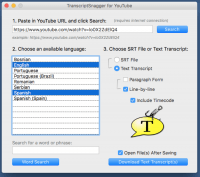
The core philosophy of TranscriptSnagger is evident in its elegant "1-2-3" workflow. You don't need to be a tech wizard, download bulky extensions, or wade through obscure settings menus. It starts with the most fundamental action: "Just paste in the URL of the YouTube video and click the Search button." That’s it. No complicated logins, no confusing configurations. The software instantly goes to work, autonomously identifying and presenting all available closed caption tracks. This automatic detection is a testament to smart design, saving you the hassle of manually searching or guessing which languages might be available.
Step two is equally frictionless: "Choose one or more of the provided languages." The languages are clearly listed, making selection a breeze. Whether you need a single language or wish to download multiple for comparative analysis, the interface makes this choice simple and quick. There's no ambiguity, no hidden options; just a clear presentation of choices that cater directly to your needs.
Finally, step three puts the power of choice squarely in your hands: "Then choose whether you want SRT files or Text Transcripts." Even within the Text Transcripts option, you're given thoughtful formatting choices – paragraph form or line-by-line, with or without timecode. This granular control, presented so simply, is a masterclass in user-centric design. You make your selection, click "Download," and just like that, each chosen language is saved as a separate, perfectly formatted file. The entire process, from identifying a video to having the desired text file on your desktop, takes mere seconds, not minutes or hours.
This commitment to simplicity means several things for the end user. Firstly, it's an incredible time-saver. By streamlining the entire operation, TranscriptSnagger eliminates all unnecessary steps, allowing you to retrieve your desired content with remarkable speed. Secondly, it drastically lowers the barrier to entry. Students, casual users, or even those who consider themselves technologically challenged can leverage TranscriptSnagger's advanced features without any prior experience. This democratizes access to powerful video content analysis and repurposing tools that were once the exclusive domain of tech-savvy individuals or expensive professional software.
Furthermore, the intuitive design reduces mental fatigue. You're not wrestling with the software; you're simply telling it what you want, and it delivers. This allows you to focus your mental energy on the content itself – on learning, analyzing, or creating – rather than on navigating the tool. In an era where digital interfaces can often feel overwhelming, TranscriptSnagger stands out as a beacon of clarity and efficiency. Its effortless operation ensures that its powerful features are not just available, but genuinely usable by anyone and everyone. This seamless user experience is the quiet genius behind TranscriptSnagger, making it not just a capable tool, but a truly delightful and indispensable addition to your digital life. Don't let this giveaway pass you by; embrace the simplicity and unlock a new level of productivity and control over your video content today!

Reviews for TranscriptSnagger
Click Here to Read Reviews for TranscriptSnagger >> Click Here to Submit Reviews for TranscriptSnagger >>